Setting markups for OTA and Agents
Rooms & ratesRooms & rates
MarkUp – the amount added to the cost price of goods to cover overhead and profit.
You can provide different markup values for different agents, to do that, navigate to the top menu:
Hotels & Houses -> Price Markups for Houses.
You will see the screen similar to shown below.
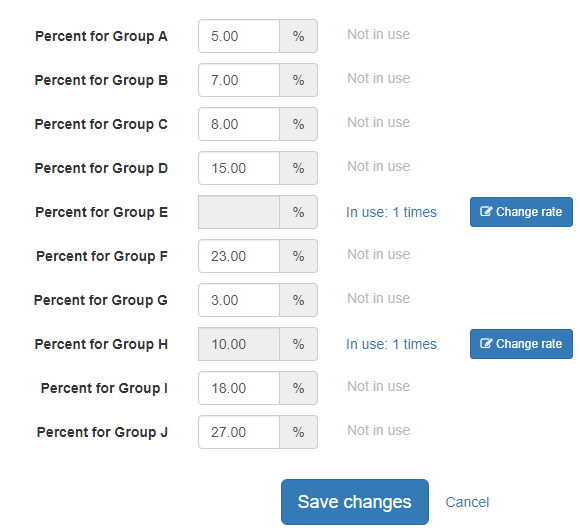
By default, ET already has predefined markups which you can always change as well as to add more markups.
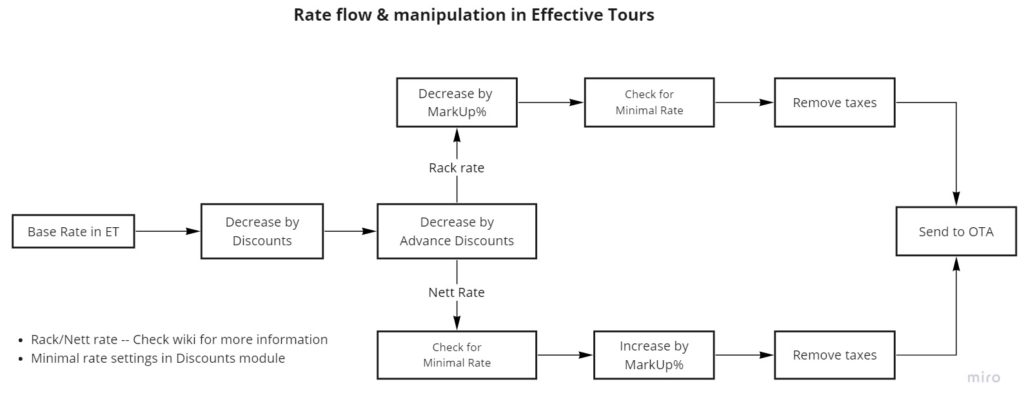
As mentioned earlier – markups will be added on top of the price of your hotel in case if you are operating with Net rates or deducted from the rates in ET in case if you are operating with Rack rates as shown on rate flow diagram below
More information about Markups and Interest in Effective Tours